 by Net Reputation
An unwanted image in Google search results can damage your reputation, expose your personal information and continue affecting opportunities long after it was originally posted. The good news is that many images can be removed or suppressed depending on where they appear and whether they qualify under Google’s policies.
This guide explains every option from Google’s removal tools and DMCA takedowns to legal remedies and long-term prevention techniques so you can take control of your online image today and into the future.
Key Takeaways
- Google can hide images from search results in specific circumstances but cannot delete them from the source website where they are hosted.
- Google’s official Results About You tool, Removals tool and category specific request forms are the primary self-service paths for image removal.
- Google may take a few days to weeks to process a request and removal from search does not delete the image from the internet.
- Contacting the site owner directly, submitting a DMCA takedown for copyrighted images and search suppression when removal is not possible.
- NetReputation provides full-service image removal and reputation management when DIY paths fall short.
Request a Free Consultation
Why Unwanted Images on Google Can Damage Your Reputation
Unwanted images in Google search results can shape first impressions before someone even meets you. This could potentially affect job opportunities, business relationships and personal connections. These images could also expose private information and increase the risk of harassment. This creates an unleading image of who you are that can persist online for years.
Potential Damages to the Public Image
Images posted online can be easily shared and viewed by a wide audience including potential employers, colleagues, friends and family members.
Embarrassing images of you such as mugshots or old pictures of your wild youth can negatively affect how others perceive you. Employers may view you as unprofessional or unsuitable for a job and colleagues may be less likely to trust or respect you. A recent CareerBuilder survey found that seven in 10 employers use online search engines and social media to screen job applicants.
Friends and family members may also feel disappointed or embarrassed by the images which could harm your personal relationships.
Metadata/EXIF Data
EXIF data (Exchangeable Image File Format) is metadata that is automatically embedded in digital images by cameras and other devices. This metadata can contain a range of information including the date and time the image was taken, the device used to capture the image and even the location where the image was taken. EXIF data can be useful for organizing and managing digital images but it can also put you at risk in several ways.
One of the primary risks associated with EXIF data is privacy. If you share images online that contain EXIF data then others can access this information and use it to track your movements, location and even your daily routines. Cybercriminals can use this information for identity theft or to conduct surveillance.
EXIF data can also be a security risk regarding sensitive information. For example, if you take a photo of a document that contains sensitive information such as bank statements or legal documents then the EXIF data could reveal this information to others who have access to the image.
Contextual Data
Contextual data in photos like location and time stamps can put you at risk in several ways. This data can reveal sensitive personal information about your daily routines and activities and cybercriminals can exploit that data for identity theft or surveillance purposes.
If this data is shared online or accessed by unauthorized parties then it can also lead to embarrassment, harassment or even discrimination. Your online reputation is at risk when embarrassing or unwanted images of you appear in web searches.
Furthermore, contextual data in photos can also be used to track your activities and interests. Advertisers, for example, can use this data to target you with personalized ads based on your location, hobbies and other activities. This can be particularly invasive and raise concerns about privacy and security.
What Types of Images Will Google Remove from Search Results?
Google removes images from search results when they fall into a defined set of policy categories. Whether a request succeeds depends on how closely the content matches one of these categories.
The current Google removal categories include:
- Non-consensual intimate or sexually explicit imagery: Google may remove non-consensual intimate or sexually explicit images shared without consent including “revenge porn” and other exploitative content.
- Personally identifiable information and doxxing content: Images that expose personally identifiable information such as home addresses, phone numbers, financial or medical data or government IDs may qualify for removal.
- Images of minors used inappropriately: Images that portray minors inappropriately may qualify for removal.
- Images hosted on sites with exploitative removal practices: Images on these sites including paid mugshot directories may be eligible for removal under specific conditions.
- Impersonation and fake imagery: Impersonation content including fake or AI-generated images that portray someone in a harmful or deceptive way may qualify for removal.
- Copyrighted images you own: If copyrighted images that you own are reposted without permission then they can be removed through a DMCA takedown request.
- Trademark violations: Images that violate trademark rights such as unauthorized commercial use of protected branding may be removed in certain cases.
- Content removed under court order: Images ordered removed by a court or legal authority can be de-indexed or taken down in accordance with that ruling.
Google individually evaluates each removal request. Even if the content appears to fall into a category, approval is not guaranteed. Meeting a policy standard does increase the likelihood of removal but final decisions depend on context and supporting evidence. These categories are documented in Google’s official Search Help and image removal policy pages.
Cases involving exploitative mugshots may also involve site-level suppression strategies. Read our guide to learn more about how to get mugshots removed.
Note that images still exist on the original website even when they’re removed from Google search results. This requires a separate takedown or suppression strategy.
Where Your Image Can Appear in Google
An online image of you can surface in far more places than the Google Images tab. This is why removal or suppression efforts need to account for multiple visibility points across Google’s ecosystem.
- Google Images search results
- Thumbnail previews that appear alongside traditional web listings
- Google Knowledge Panel for people and organizations
- Google Discover personalized feed
- Google AI Overviews and other generative answers that embed images
- Google Maps and Local results (especially for business listings)
- Google Shopping carousels for product images
- Rich Media results enhanced by Schema markup.
Increasingly, images are being embedded in Google AI Overviews and other generative search experiences where content is synthesized and displayed directly within AI-generated answers. Images may also appear in Google Maps and local search results particularly when tied to business profiles or location-based listings. Images in commercial contexts can surface in Google Shopping carousels and product listings. Additionally, rich results powered by Schema markup can enhance visibility across various search features.
Removing an image from one area like Google Images does not guarantee removal on all surfaces. AI-driven and structured-result environments may continue to display the content unless you address them separately. You must identify every Google surface where the image currently appears before any removal strategy or suppression strategy can be effective.
How to Find Every Place Your Image Appears Online
Finding every public copy of your image is the first practical step before requesting removal. Google de-indexing only hides results in search while the original file may still exist across multiple websites.
A good starting point is performing a reverse image search using Google Images or Google Lens. Go to Google Images Reverse Search, click the camera icon in the search bar and upload the image file or paste its URL. Review the list of pages where the image appears and open each result. You can also use Google Lens directly from Chrome by right-clicking an image or tapping “Search Image With Google.” Be sure to document every source URL you find.
As a secondary step, you can also use TinEye Reverse Image Search. This tool often uncovers older, syndicated or altered versions of the same image that Google may not resurface. Running both tools increases your chances of identifying the full spread of both indexed and unindexed copies.
Next, perform a manual, name-based search workflow. Search for your full name, your known nicknames, your employer name and your city in an incognito browser window. Then switch to the Images tab. Open any result that includes your image and record the exact hosting page.
It’s also important to maintain a tracking list. This is typically a simple spreadsheet that contains the page URL, hosting domain, contact or removal method, date of discovery and status of outreach. This will become your working document for all removal and suppression steps.
Note that older versions of images may persist in archives such as the Wayback Machine even after they’ve been removed from the original source. This can require additional follow-up options. Check out our guide on how to know if someone is searching for you online for a look at broader monitoring strategies.
Request a Free Consultation
How to Remove Images You Uploaded Yourself
The fastest path to removal is deleting the image from any account or website you control. Google typically re-crawls pages over time and drops images from search results once the source content is no longer available.
Start with social media cleanup. Log into platforms such as Facebook, Instagram, LinkedIn, X, TikTok or any other service where the image may have been posted. Delete the original post that contains the image, remove any tagged versions of yourself and review past uploads or albums where duplicates may exist. It’s also important to update your privacy settings so future posts aren’t publicly indexed or easily crawled by search engines.
Next, review any websites you own or manage through a CMS such as WordPress or Squarespace. Delete the image from both the page itself and the media library. Files stored in the backend can still be accessible even after they’re removed from visible content. Also check archived pages, drafts and older blog versions that may still contain the image.
Even after an image has been removed at the source, Google will not update results immediately. You can speed up the process using Google’s Refresh Outdated Content tool. This prompts Google to re-crawl a page and update its index. In most cases, full de-indexing takes anywhere from a few days to several weeks depending on crawl frequency and site authority. If the content is sensitive then you may need to submit separate removal requests to those archive services.
For a wider look at cleanup beyond self-posted content, see our guide on how to remove personal information from the internet.
How to Remove Images Posted by Other Websites
When someone else’s site is hosting the image, you can contact the website owner directly and request removal before involving Google. This is often the most effective approach because if the source removes the image then Google will eventually remove it from search results as it re-crawls the page.
Start by identifying the site’s contact information. The website’s Contact Us, About Us or Privacy Policy pages should contain an email address of contact form. If no contact information is listed then you can use a WHOIS lookup service to identify the domain registrant or administrative contact. As a final option, look up the site’s hosting provider and locate its abuse-reporting contact information.
Remain polite and professional when reaching out. Website owners are more likely to respond to a clear request than an angry or threatening message. A sample email template is below:
Subject: Request for Image Removal
Hello,
I am requesting the removal of the following image/page:
URL: (Insert URL)
The image contains content that raises concerns related to (privacy/copyright/defamation/other reason).
I would appreciate your review of this request and confirmation if the image is removed.
Thank you for your time and consideration.
Sincerely,
(Your Name)
Remember that website owners are generally not required by law to remove an image just because someone requests it. The decision to remove the content is often voluntary unless a specific legal claim applies like copyright infringement, defamation, a valid court order or another recognized legal basis.
Be prepared to show persistence and patience. Many requests are ignored or denied particularly by websites that profit from the content like mugshot databases and content aggregators. If reaching out directly fails then your next step is to pursue removal or de-indexing through Google and other available channels.
Professional content removal services may help coordinate outreach and legal review as well as search result suppression strategies.
How to Submit an Image Removal Request to Google

Google provides several self-service tools and forms for image removal and the right option depends on your situation. The three primary paths include:
- The Results About You tool for personal contact information and identifying data
- Google’s dedicated removal request forms for categories like explicit imagery and minors
- The Removals tool in Google Search Console for website owners removing their own content from search results
Using the Result About You Tool
The Results About You tool is Google’s primary option for removing search results that expose personal information. To get started, sign into your Google account and open the tool. Set up monitoring using your name, phone number, email address, home address and other identifying details. Google will notify you when matching content appears in search results.
When an image surfaces as part of a monitored result, you can review the listing and submit a removal request directly through the tool. This workflow has largely replaced older personal-information removal processes and provides a centralized dashboard for tracking requests.
Submitting a Category-Specific Removal Request
Google maintains separate request forms for content that falls into specific policy categories. These include:
- Non-consensual intimate imagery (NCII)
- Explicit deepfakes
- Impersonation content
- Doxxing
- Threats involving personal information
- Images of minors
Each category has its own eligibility requirements and evidence standards. For example, Google may request screenshots, URLs, proof of identity or additional context that shows why the content violates a policy. Google periodically updates these forms and requirements, so be sure to reference the latest documentation on Google’s official image-removal and content-removal policy pages when submitting a request.
Using Google Search Console
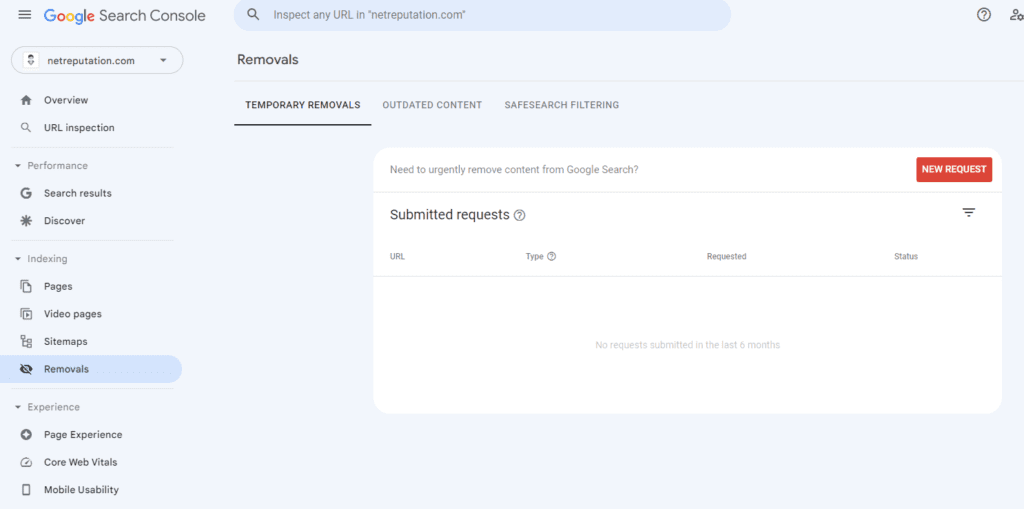
If you own the website hosting the image then the Removals tool in Google Search Console can help rmove it from search results more quickly. This tool is not designed for third-party takedowns.
After deleting the image from your site, use the Removals tool to request a temporary block from Google Search while Google re-crawls the page. For permanent removal, the image must remain deleted or inaccessible on the source website. Search Console can then help accelerate the de-indexing process.
For a deeper look at Google’s search-removal process, see our guide to removing something from Google search.
Note that Google can only remove the image from its search results, not from the actual website where the image is hosted. If the image is on a website that you own then you can remove it directly from the website. However, if the image is on someone else’s website then you will need to contact the website owner and ask them to remove the image.
Most requests are reviewed within a few days to a few weeks with NCII and minor-related requests taking priority. Requests involving non-consensual intimate imagery or minors are typically prioritized but approval still depends on whether the content clearly falls within one of Google’s removal categories. If it doesn’t then denial is common.
When Google declines a request, there are still several additional strategies available for reducing or removing the image’s online visibility.
What to Do When Google Refuses to Remove Your Image
A denial from Google is not the end of the road. There are three further paths you can pursue:
- Keep working the source site
- Pursue legal removal
- Shift to suppression
Start by contacting the website owner. Explain why you want the images removed and be polite and professional in your communications. If the images are still appearing in search results even after you’ve requested their removal then you can modify the images to make them less identifiable. For example, you could blur or pixelate faces or other identifying features in the images.
If the images are particularly damaging or violate your rights then you may need to consider legal action. This can be a more complex and costly process but it may be necessary in some cases.
When removal isn’t possible, it may be time to shift into a more suppression-focused strategy. Online reputation management services like NetReputation can help you remove unwanted images from Google search results. Our professional services use various techniques including content removal, content promotion and content suppression to push the images down in search results or remove them altogether.
Note: NetReputation does not provide legal advice. Readers with potential legal claims should consult an attorney for their specific situation. Our strategies focus on reputation outcomes and content removal, not legal counsel.
How to Suppress Unwanted Images in Google Search Results
Suppression is the process of pushing unwanted images off the first page of Google by publishing new, optimized content that ranks above them. This strategy does not remove the original image or URL but it does reduce visibility by replacing negative or unwanted search results with more relevant and positive content. As the overwhelming majority of clicks occur on page one of Google, moving an unwanted image to page two or lower can dramatically reduce how often it’s seen.
One of the most effective suppression tactics is building a personal website. Purchasing a domain that matches your name and creating a professional personal-brand site gives you a highly controllable asset that can rank for name-based searches. On your website, remember to include the following sections:
- A detailed About page
- Professional photos
- Biographical information
- Accomplishments
- Contact details
Regular updates demonstrate relevance to Google, though ranking a new website usually takes weeks or months rather than days.
Public social media profiles are another valuable tool. Optimize LinkedIn, Facebook, Instagram, YouTube and other major platforms. Use your full name, a professional headshot and complete profile information. These platforms already have substantial authority in Google search results so well-optimized profiles often rank much faster than standalone websites.
Content publishing creates additional ranking opportunities. Contribute guest articles to industry websites, publish thought leadership content on platforms like Medium and LinkedIn and seek opportunities to appear in professional directories or publications. When possible, use your full name and professional photo in your author biography. Each new piece of content will become another asset that can compete with unwanted images in search results.
For business owners, optimizing a Google Business Profile is often an overlooked suppression tactic. Regularly adding branded photos and business information can strengthen positive search visibility. It also increases the likelihood that favorable images will appear prominently in local search results.
For a deeper look at search result suppression strategies, see our guide on how to bury negative search results on Google.
Suppression is most effective when approached as an ongoing reputation management strategy. Professional suppression campaigns can help accelerate results when DIY efforts aren’t enough.
Legal Options for Removing Images from Google
When Google’s policy-based removal tools and suppression strategies aren’t enough, legal pathways may be available for certain image categories. Depending on the situation, potential legal options include:
- Copyright claims
- Defamation actions
- Non-consensual intimate imagery laws
- Criminal remedies for extortion
Note: NetReputation does not provide legal advice. Readers should consult a qualified attorney about their specific circumstances.
If you own the copyright to an image such as a photograph that you personally took, then you may be able to submit a takedown request under the Digital Millennium Copyright Act (DMCA). A valid DMCA notice must:
- Identify the copyrighted work
- Identify the infringing image and its location
- Provide your contact information
- Include a good-faith statement that the use is unauthorized
- Contain a statement made under penalty of perjury that the information is accurate
Copyright owners can submit DMCA requests to both the website hosting the image and to Google for removal from search results.
Defamation may be another legal avenue when an image is published alongside false statements that harm a person’s reputation. Individuals can sometimes seek removal demands or court orders requiring the content to be taken down. Defamation claims usually require proving that the statements are false and caused measurable harm and the legal standards vary by state. If court filings or legal records are involved then you can reference our guide on removing court records from the internet.
Legal protections have expanded substantially for non-consensual intimate imagery. All 50 states and the District of Columbia now have laws that address the non-consensual distribution of intimate images. In addition, the federal TAKE IT DOWN Act created new protections and removal obligations for covered online platforms. Victims can find guidance and support through the Cyber Civil Rights Initiative (CCRI).
If someone is threatening to publish images unless you pay money, send content or comply with other demands, the situation may constitute blackmail or extortion. These are criminal matters that you should report to law enforcement immediately. Paying rarely resolves the problem and often encourages further demands rather than ending the threat.
Legal remedies can take longer and cost more than self-service removal methods. However they often provide the strongest and most enforceable path to permanent resolution when an image qualifies.
Request a Free Consultation
The Real Cost of Leaving an Unwanted Image on Google
Leaving an unwanted image visible in Google search results can create compounding reputational damage that becomes more difficult to control over time. Before deciding if removal is worth the effort, consider the following potential costs.
1. Professional Impact
Employers, recruiters, clients and business partners routinely research people online before making decisions. Screening practices can vary by industry but online reputation remains a significant factor in hiring and business evaluations, especially for leadership and trust-sensitive roles.
2. Social Impact
Friends, family members, dating prospects and community organizations often search online before forming opinions. A single image taken out of context could shape perceptions long before you have an opportunity to explain it.
3. Legal and Compliance Impact
For professionals in regulated industries like finance, education, healthcare and law, public online content may create extra security during licensing reviews, background checks, board appointments or security clearance processes.
4. Harassment and Bullying Risks
Visible images can attract unwanted attention, especially when they appear in searches for your name. In some cases, one image could become a focal point for trolling, doxxing attempts, cyberbullying or targeted harassment campaigns.
5. Lost Opportunity Cost
Not every lost opportunity comes with an explanation. Potential employers may move onto another candidate, event organizers may choose another speaker or business partners may quietly decide not to proceed based on what they find.
6. Long-Term Digital Footprint
Even after an image is removed from its original source, copies may still remain in caches, archives, screenshots and third-party websites. The longer it remains online, the more likely it is to spread beyond its original location.
The wider issue is trust. The 2025 Eldeman Trust Barometer found that trust continues to play a central role in how people perceive the credibility of individuals and organizations online. As a result, addressing unwanted images is often far less costly than allowing reputational damage to compound over time.
As part of a more comprehensive personal reputation management strategy, removal efforts can help protect future opportunities while reducing the likelihood of similar issues recurring.
How to Prevent Unwanted Images from Appearing in Google in the Future
Prevention requires controlling what gets uploaded, monitoring search results regularly and locking down privacy settings across every account that can post or tag your name.
Start by tightening your privacy settings across all major platforms:
- Facebook: Set your posts to “Friends Only.” Then, review the “Timeline and Tagging” sections so tags require approval.
- Instagram, switch to a private account and disable sharing to limit public search visibility where possible.
- LinkedIn: Limit profile visibility and activity broadcasts if images aren’t meant for broad indexing. X: Protect your posts where appropriate and restrict media discoverability.
- TikTok: Set your account to private and control who can comment, duet or stitch your content.
Across all platforms, disable tag suggestions and review any settings that allow search engines to index your profile.
Next, reduce accidental metadata exposure. Turn off location services for your phone camera so future photos don’t include GPS-based EXIF data that can be reused when images are uploaded elsewhere.
Monitoring is equally important. Set up Google Alerts for your name and common variations to be notified when new content appears and periodically run reverse image searches on your profile or professional photos. You can also consider ongoing reputation monitoring services for continuous oversight.
Proactively publishing positive content is another safeguard. Regularly posting professional photos and content under your own name helps ensure search results are dominated by the assets you control.
Finally, reduce exposure access across data broker and people-search sites that often syndicate from public sources. Opting out of these databases lowers the chance of images resurfacing elsewhere and strengthens your internet privacy.
Google Image Removal FAQs
Here are answers to a few of the most commonly-asked questions we receive about removing an image from Google.
How long does it take for Google to remove images?
The time it takes for Google to remove images from search results can vary depending on a number of factors. These include the number of requests they are receiving, the complexity of the request and whether the request meets Google’s criteria for removal. In general, Google aims to process removal requests as quickly as possible but it can take several days or even weeks for images to be removed from search results.
Google provides an estimated timeframe of one to two days for removing URLs from search results through the Removals Tool in the Google Search Console. However, this is only an estimate and the actual time can vary. It’s also important to note that removing the image from search results does not guarantee that it will be completely removed from the internet.
If you need to have an image removed quickly, you can use Google’s “urgent” removal feature. This feature is designed for cases where there is a risk of harm or danger including cases of revenge porn or other explicit images. Google prioritizes these urgent requests and aims to remove the content within 24 hours.
Does Google permanently delete photos?
No, Google does not permanently delete photos from the internet. When Google receives a request to remove an embarrassing or unwanted photo from search results, they will remove it from their index so the photo will no longer appear in Google search results. However, the photo may still exist on the website where it was originally posted or on other websites that have shared the image.
Google’s removal of the photo from search results can help prevent others from easily finding the photo online but it does not guarantee that the photo will be completely removed from the internet. The best way to ensure that a photo is completely removed is to contact the website owner and request that they remove the photo from their website.
What is the cost of getting your image removed from a Google search result?
There is no cost associated with requesting the removal of your image from a Google search result. Google provides a free service called the “Removals tool” in the Google Search Console that allows users to request the removal of unwanted images from search results.
Costs do come into play when you hire an online reputation management company, a content removal team or an attorney. Charges associated with image removal may depend on the complexity and volume of images to be removed, where those images are located and whether or not copyright violations have occurred.
Note that pay-to-remove sites violate Google’s policy and should be avoided.
Can I remove an image from Google if I do not own the website it is on?
Yes but only in certain cases. Google may remove images from search results if they fall into an approved category including NCII, doxxing, exposed personal information, images involving minors or copyright violations covered by the DMCA. Removal is less likely if the image doesn’t fit into one of Google’s policies,
What is the Results About You Tool?
Results About You is Google’s newer privacy management tool that helps individuals monitor and request the removal of search results that contain personal contact information. Unlike Google’s older Removals tool which primarily focuses on outdated or cached search results, Results About You proactively scans for personal information tied to your identity and streamlines the removal request process through a dedicated dashboard.
Will removing an image from Google also remove it from AI Overviews and Google’s other surfaces?
Not necessarily. When Google approves a removal request, the decision only applies to specific Google products and surfaces identified in the approval. Because AI overviews, image searches, cached results and other Google features may display information directly, additional review or removal requests might be necessary.
Even after a successful removal, ongoing monitoring is important to ensure the image doesn’t continue to appear through other search features or future indexing.
Can I file a DMCA takedown for an image of me that someone else owns?
Generally, no. The DMCA protects copyright owners and not the subjects of photographs. To submit a valid DMCA takedown request, you typically must own the copyright to the image, either because you took the photo yourself or you commissioned it under circumstances that transferred ownership rights to you.
If you appear in the image but do not own it then other legal remedies like defamation, privacy claims, NCII laws or court orders may be more appropriate.
What if my image keeps coming back after I have removed it?
This is a common problem. Images are frequently copied, archived, syndicated and republished by data broker sites and scraper networks. As a result, a successful removal from one source doesn’t always prevent the image from resurfacing elsewhere. Ongoing monitoring, repeat removal requests and periodic searches are often necessary. Many professional reputation monitoring services include continuous monitoring to identify and address new instances as they appear.
Get Professional Help Removing Images from Google
Once harmful images are posted to the web, they have a tendency to follow you until you do something about them.
At NetReputation, we’ve helped thousands of clients build, protect, repair and manage their online reputations. Our content removal team uses proven strategies and state-of-the-art tools to remove unwanted content including mugshots, photos and negative search results, from Google. We even offer a satisfaction guarantee on removal campaigns per brand differentiators.
Contact NetReputation today by dialing 844-461-3632 or by completing the form below.